Know where every slab is. Not where the system thinks it is.
RFID-JET Business Intelligence turns the physical activity in your warehouse into a clear picture: what you have, where it is, and when it was last actually seen. Every figure is backed by a physical read, or clearly marked as record only.
- Works alongside your ERP
- Uses the reads you already capture
- Built for stone slab warehouses
LQ5998L-20260422R-11
Taj Mahal Quartzite, 3 cm, batch 20260422R
- ReceivedReceiving dock RCV-1, Apr 22Read
- StoredAisle H, bin H-58, Apr 23Read
- Confirmed in countGlobal count, H-58, Oct 6Read
- MovedH-58 to B-04, Oct 7Read
- OrderedSO-20261008-031, Oct 8Record
- Picked to stagingSTG-1, Oct 9, 11:42Read
Your system tells you where inventory should be. RFID-JET tells you where it was last seen.
Every ERP records where a slab was put. Over months, slabs get moved, restacked, picked, returned and borrowed for showroom visits, and the record drifts from the floor. The gap stays invisible until a customer is waiting.
Records alone
- Says a slab is in G-12 because that's where it was entered, months ago
- Marks an order shipped without proof the right slabs went out the door
- Finds problems at the yearly count, long after anyone remembers why
- Treats every number as equally true
Records plus RFID-JET
- Shows the last bin the slab was physically read in, and when
- Matches each order slab by slab against the door read
- Flags a drifting bin the week it starts, with the moves that caused it
- Tells you how sure it is, and what it can't see
Every slab gets one honest status.
Each slab in stock is classified from its records and its last physical read. Every report and answer uses the same classes, so two people asking the same question get the same number, and you always know how much to trust it.
Thresholds such as 7 and 30 days are your rules. Owners can change them, and every report follows.
| Status | Meaning | Slabs | Next step |
|---|---|---|---|
| Seen in its bin | Read in its recorded bin in the last 7 days | 1,504 | Send someone |
| Seen, other bin | Read recently, not where the record says | 108 | Fix the record |
| Seen 8 to 30 days ago | Probably where it was | 121 | Verify |
| Not looked at | Its aisle hasn't been counted lately | 38 | Count the aisle |
| Not seen 30+ days | Its aisle was counted and it wasn't read | 52 | Go find it |
| Left the building | Read going out a door, still in stock on record | 4 | Investigate |
| Record only | Never physically read | 15 | Check paperwork |
Nine ways to see your inventory.
Each one answers questions your team already asks every day.
Inventory health
How much stock is confirmed where the record says, by location, product and aisle, and how that's trending.
How sure are we of where our stock is?Item journey
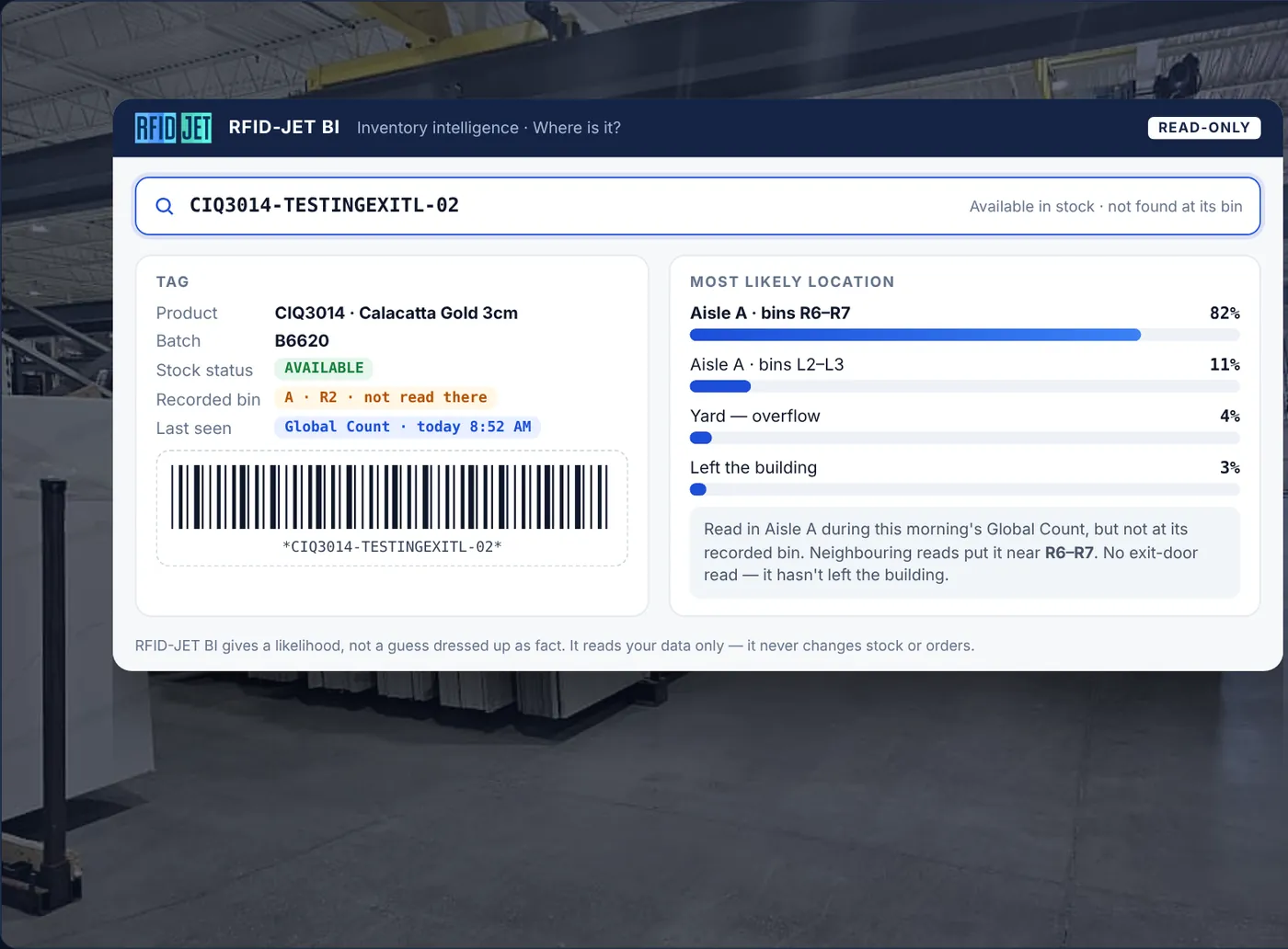
One slab's full story: every bin it lived in, every read, every order and door event, with a plain verdict on where it is now.
Where is this slab right now?Movement intelligence
Receiving, put-away, bin moves, transfers between locations and returns.
Which transfers haven't arrived?Order and shipping proof
Sales orders, consignments and transfers matched slab by slab: on order, picked, read at the door, marked shipped.
Did anything leave with no order?Warehouse and bin view
Every location, aisle and bin on a floor map: how full it is, how sure we are of it, when it was last counted.
Which bins can we trust?Count accuracy
What each count found against what the record expected, which bins drift, and the moves that explain the gap.
Which bins should we recount first?Dwell time and aging
How long slabs have been with you and sitting untouched: forgotten bins, slow movers, broken bundles.
What has been here over a year?Exceptions
One queue of what needs a person: not seen, seen in the wrong place, location conflicts and unexplained exits.
What needs attention today?Ask your inventory
Ask in plain words, get an answer built only from your own records, then save it as a report that runs itself.
Can I promise 6 from one batch?Ask in plain words. Get an answer you can check.
Owners, sales and yard staff ask the way they talk. RFID-JET answers from your own records, shows how it read the question, and says plainly what your data can't confirm.
- Your data only. Nothing is searched online.
- Numbers come from your records, never estimated.
- Stale counts and aisles with no reads are called out.
- Good answers become scheduled reports and alerts.
Where are the Calacatta Gold slabs nobody has seen in 30 days?
13 of 64 Calacatta Gold slabs at 40WBC haven't been seen in 30 days.
| Bin | Slabs | Status | Most likely |
|---|---|---|---|
| G-12 | 4 | Not seen | Buried behind siblings |
| F-03 | 3 | Not seen | Half the bin missed at count |
| H-04 | 3 | Not looked at | Aisle H not counted since Sep 2 |
What the data can't tell you: one slab was read leaving Door 2 on Aug 29 with no order behind it.
Example. Sources: stock, bin movements, global counts, door reads.
Proof at the door for every shipped slab.
A clean shipment has four records that agree for the same slab. RFID-JET checks every line and shows you the ones that don't, before the customer calls.
- On orderThe slab is on a sales order, consignment or transfer.
- PickedIt was picked and staged for loading.
- Out the doorThe door readers physically read it leaving.
- Marked shippedThe record was closed as shipped.
Shipped with no door read
Marked shipped, never seen leaving. Is it still here?
Left with no order
Read going out with nothing on order. Where did it go?
Wrong slab sent
A different slab left than the one on the order.
One source of truth, five ways to use it.
Each person sees what helps them act, from the same numbers.
Owners and executives
- Inventory health by location
- Weekly change at a glance
- The top five things to fix
Sales desk
- Slabs seen this week
- Full bundles from one batch
- Order readiness before pickup
Yard and pickers
- Last bin a slab was read in
- Put-away lists for new stock
- Pick lists in walking order
Counters
- Recount routes ranked by doubt
- Aisles overdue for a count
- Tags that read poorly
Shipping
- Slab-by-slab door match
- Exits with no order
- Consignment still out
Built on what you already capture.
Business Intelligence reads the activity RFID-JET already records through your handhelds, door readers and connected ERP. No new data entry, no replacement of your ERP, no pricing data required.
Read-only
It reads your records and never changes them. People decide.
Every figure traceable
Click any number to see the slabs, reads and sources behind it.
Role-based access
People see the locations and screens their role needs, and nothing more.
Freshness shown
Each source shows when it last updated, and stale counts are flagged on every answer that uses them.
Full audit trail
Every question, report and export is logged: who, when and what it read.
From switch-on to decisions.
Business Intelligence runs on your existing RFID-JET deployment. We set it up with you, tune it to your floor and train each role.
Connect
Link your locations, aisles, bins, doors and order records.
Calibrate
Learn how each aisle and tag reads, and set your rules for seen and not seen.
Go live by role
Owners, sales, yard, counters and shipping each start with the screens they need.
Review and improve
Regular reviews of health trends, recount results and the questions your team asks.